

Our bodies were not made to do this. So much of our modern life could count for “this,” but today I mean “typing on a keyboard.” Typing has a deadly combination of (a) general stillness, (b) unnatural positioning and (c) repetitive strain. In particular, the wrist and the elbows can get absolutely fucked by day-in day-out typing.
All of this is made worse by the fact that the conventional and most economic way to build a keyboard—a single flat plane, in a staggered grid layout with a squishy membrane beneath to register the impact—is also an ergonomic disaster. The single plain forces the elbows outwards and for the wrists to rotate, both of which cause consistent strain. The staggered layout causes unnatural reaching and makes it difficult to use the fingers evenly in typing, which causes greater strain. And the membrane absorbs the force of typing, forcing the fingers to expend more work in returning from a key, which again increases strain.
There is no such thing as a perfectly ergonomic keyboard. Ultimately the human body does not do well with prolonged stillness and repetitive motions. However, the equipment can make a significant difference in how damaging the act of typing is to our bodies. This difference compounds over a lifetime.
Therefore, early into my career as a professional typer on computers (tm), I bought a Kinesis Advantage.
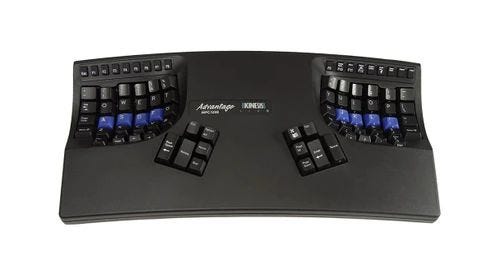
This keyboard looks alien and potentially intimidating if your reference point is a laptop or commodity keyboard. It’s expensive (relative to a cheap keyboard), it’s big, it’s demanding. I used it for over ten years.
The immediate thing you discover when switching to a split ergonomic keyboard (split meaning that the keys are divided into two groups, one for each hand, with separate “thumb clusters”) is that you cannot type nearly as quickly as you could with an ordinary layout. While a typing tutor may tell you to keep your hands aligned to a home row, nothing about the design of the ordinary layout pushes you towards this discipline. Indeed, the smaller size, with your hands pushed into one another, makes this typing discipline significantly awkward. Hence the technique people actually practice on an ordinary keyboard is some bullshit that later gets habituated into muscle memory. A split ergonomic keyboard, especially a contoured one where the keys form a “well” that pulls your finger in, cannot be successfully operated with “some bullshit.” The design forces the hands to be separated and for each finger to have an assigned “zone” of ownership.
Again, the point is not to type faster. I am a mediocre typist, wpm wise. This kind of keyboard is also quite bad when it comes to playing video games for the reason that it cannot be used one handed, so a “keyboard and mouse” setup is right out. (And the mouse is its own ergonomic disaster, more on which in a second.)
A few months ago, the feebleness of my flesh began reasserting itself and my wrists began to hurt. God was punishing me for my sins, but the only relief I knew how to seek was in consumerism. Over the last couple of decades, as 3D printers and cheap foreign fabrication and shipping made producing custom or small-run electronics feasible, the marketplace of ergonomic keyboards has absolutely exploded.
A mechanical keyboard is not actually that complicated of a thing. You need a printed circuit board which will handle wiring keys to a microprocessor, which turns the keypresses into a signal that can be wired or bluetoothed to a computer. For a split keyboard, you need two of these configured in such a way that one side relays its keypresses to the other. The processor will be running some software, the firmware, which tells it how to do this translation. For a wireless keyboard, you also need a battery (per side) to power the keyboard. Into this PCB you slot your processor, your battery, and the switches. A switch is a button that, when pressed, completes a circuit in the PCB. Keyboard switches have an arrangement of springs that apply force when depressed so the key pushes back on the fingers when pressed (which actually means typing takes less kinetic energy, as the pushback saves the fingers the effort of moving back into position). Solder all your electronics together, screw a case around it, and attach keycaps to your switches, and, hey presto, you’ve got a keyboard.
Switches, keycaps, processors, these are now commodity components. There is significant variety in this space so that one can buy different switches which apply different amounts and arcs of force against the finger or different keycaps of different depths and shape. Ergonomic keyboards will vary most in terms of the number and configuration of keys. As a result there is an actual infinity of options here. You can buy something more “brand name” like a Kinesis, which will get you a reliable manufacturing and usually more fit and finish, but the massive possibility space here means that the world of ergonomic keyboards is a world of niche players.
Often the keyboards in this space are not really “products” as you traditionally would understand them: things a company has designed, figured out the manufacturing of and the selling of. Instead, the model can be much more federated. All you need to make a keyboard is (a) a PCB design, (b) firmware, and (c) a case design that can be printed (or, for upscale options, machined). You can, and people do, upload those designs for anyone to use on GitHub and wait for various niche keyboard producers to turn those designs into kits (PCB, flashed processor, and case in a box; bring your own switches and keycaps and solder it yourself) or on-demand fabricated boards sold from Etsy or AliExpress. For those with a bit more gumption, you could pay a fabricator to print your PCB, buy and flash a processor yourself, print out a case and solder everything yourself.

So far I have entered this labyrinth and escaped with just a single keyboard (the Geist Totem) and a hole of a few hundred dollars in my pocket. Given the dizzying variety of designs, it is hard to find reliable guidance here. Part of that variety after all, is driven by the variety of human hand shapes, so the keyboard which fits my hand may not fit yours. The other major axes of keyboards are number of keys and whether and which a “mouse replacement” is part of the keyboard.
Taking these in turn. In terms of key counts: a smaller number means less finger movement to type (in the limiting case, you could get by with only one key per finger) but more keys become sequences and combinations of key presses (think of how the Shift key goes from lower case to capitals or numbers to symbols; small keycount keyboards have a lot more of that going on) which take time to learn and can be slow or fiddly to input. The Totem has 38 keys (compared to the 78 I counted on my laptop keyboard); it’s only after a couple months that I feel like I’ve really internalized the layout (part of that was my tinkering with the layout and so undoing muscle memory). Even still I make the occasional mistake.
The other important question is whether you want a mouse integrated into your keyboard. This would look like a trackpad or trackball, usually near the thumbs. The advantage from an ergonomic perspective is that (a) the mouse is inherently a worse bit of ergonomic kit than the keyboard as it requires the arms to be raised and so puts more pressure on the wrist and elbow and (b) the motion of moving from keyboard to mouse is a straining one. So far I have been attempting to do without this by (a) configuring my computer so that almost nothing requires the use of a mouse and (b) remapping part of my layout to be able to control the mouse with the keyboard.
Oh, and I bought a set of clamps and camera arms so I could float my keyboard off of my desk and angle it in a weird, acute fashion. Just in case you were not already convinced that this is utterly deranged.
Should you do this? Well, I think ergonomics, like other aspects of health and overall wellbeing, are too easily ignored. If you type for any substantial portion of the day, I think you should absolutely get a mechanical keyboard (Keychron is decent) and should look into getting an ergonomic keyboard (I’ve heard Ergodox is decent and decently affordable; I still recommend the Kinesis). If you are a high-income person who uses the computer a ton, then I think you should absolutely go off the deep end and try and put together a setup that will be decent to your body over the long term.